Get an estimate for your video project in less than a minute.

Get an estimate for your video project in less than a minute.
Types of camera shots describe how much of a scene you see while angles and movements describe where the camera sits and how it travels. These are the building blocks of how a filmed scene looks. This guide explains the common choices and how we use them for interviews, supporting footage, events and products so you can understand what a planned shot contributes to your video.
| What are the types of camera shots? The main types of camera shots by size are extreme wide, wide, full, medium wide, medium, medium close-up, close-up and extreme close-up. Two shots, over-the-shoulder, point-of-view and insert shots add viewpoint. Angles such as eye level, high, low and Dutch set where the camera sits. Movements such as pan, tilt, dolly and tracking set how it travels. |
Shot size is how much fits in the frame, angle is where the camera sits and movement is how the camera changes position or direction.
A close-up can be filmed at eye level or from above. Either version can stay still or move. These choices work together rather than forming competing categories.
The size determines how much surrounding context the viewer receives. The angle changes the relationship between the viewer and the subject. Movement changes what is revealed and how attention travels through the scene.
A useful shot description identifies the choices that matter. Saying medium close-up at eye level tells the crew more than asking for an interesting angle. Camera shots and angles become practical tools when they connect to the information or feeling a scene needs to communicate.
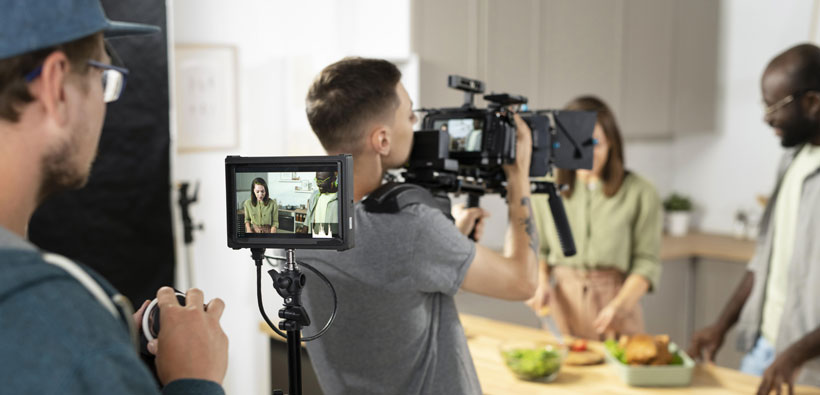
Camera shot sizes control how much of the subject and surroundings you see.
An extreme wide shot makes the setting dominant and the subject small. It can establish scale or distance before closer action begins. The viewer understands where the scene takes place. We can use it on a business shoot to show a large site in its surroundings. The subject needs enough separation to remain identifiable if recognizing it matters to the scene.
A wide shot shows the subject with enough surroundings to explain its position. It gives the viewer context without making the person or object tiny. The image can feel open and observational. We use it to establish a workspace before cutting closer to the activity. A clear wide view helps details feel connected to a place rather than appearing as fragments.
A full shot includes a person’s body from head to feet. It makes posture and movement readable within the frame. The viewer can see how the subject occupies the space. We use it when a workplace demonstration depends on stance or a physical action. The framing needs enough room for the movement without cutting off the body at an important moment.
A medium wide shot frames a person from around the knees upward. It preserves body language while bringing the viewer closer than a full shot. The image can feel conversational without losing the setting entirely. We use it for a presenter who gestures or handles an object. It gives hands and movement room while keeping the face prominent in the composition.
A medium shot shows a person from around the waist upward. It balances facial expression with gesture and surrounding context. The viewer feels close enough to listen without entering an especially intimate view. We use it for interviews and direct presentations. Its usefulness comes from that balance. A speaker can move naturally while the frame still keeps attention on what they are saying.
A medium close-up frames a person from the chest upward. It emphasizes expression while keeping some shoulder and body context. The viewer can concentrate on the speaker’s face without an extremely tight composition. We use it for interviews where the message matters more than the room. Small movements remain visible and the framing can feel direct without crowding the person on screen.
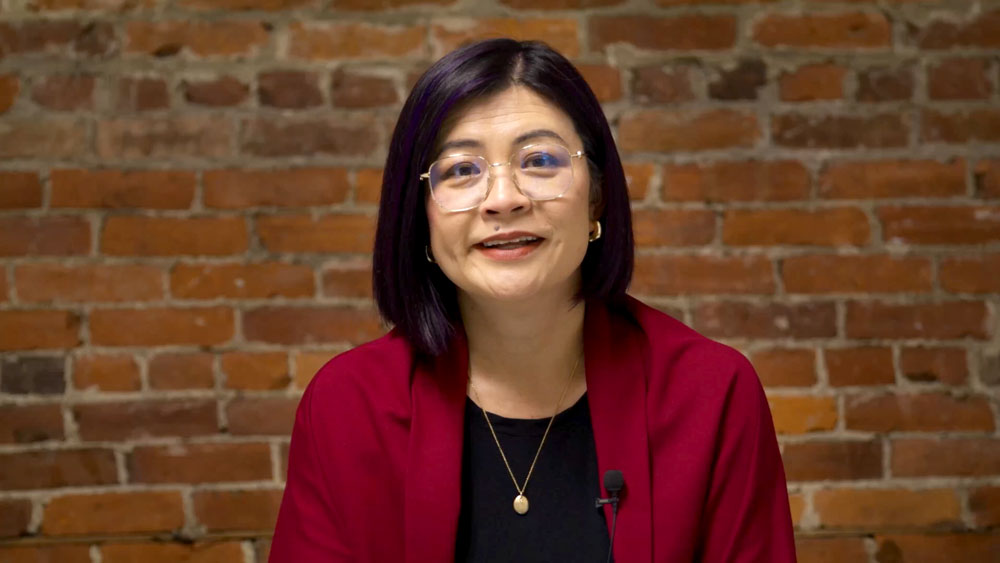
A close-up isolates a face or important subject within the frame. It directs attention toward expression or a specific feature. The viewer has less context and a stronger relationship with the detail. We use it for a meaningful interview moment or a product feature. Its effect depends on what came before it. A closer view gains purpose when the detail matters.
An extreme close-up shows a detail such as an eye or a precise part of an object. It can create intensity or make a mechanism readable. The surrounding context disappears. We use it when a business video needs to show a connector or surface detail that would be lost in a wider view. The detail needs a clear relationship to the explanation.
A two shot places two people within the same composition. It describes the number of subjects rather than a fixed framing size. The viewer can read their relationship and space. We use it for an exchange between colleagues or an interviewer and participant. The framing should give both people a role instead of leaving one crowded at the edge of the picture.
An over-the-shoulder shot looks past one person toward another subject. The foreground shoulder gives the viewer a position inside an interaction. It can make an exchange feel connected rather than separately recorded. We use it for workplace conversations or a person using equipment. The foreground should provide context without blocking the action or becoming the most distracting shape in the image.
A point-of-view shot presents the scene from a character’s or participant’s apparent viewpoint. It helps the viewer understand what that person sees. The image can feel immediate and practical. We use it for a demonstration where the user’s perspective makes a task clearer. The camera position needs to match that purpose rather than simply being close to the object being handled.
An insert shot isolates a detail that supports the main action. It may show a hand using a control or a document being signed. The viewer receives information without losing the scene. We use inserts to make workplace processes understandable and to support an edit. The detail should match the action and position established by the footage so it feels connected.
Different types of camera angles change the viewer’s relationship to the subject by changing the camera’s height or orientation.
An eye-level angle places the camera near the subject’s eye height. It usually creates a direct and relatively neutral relationship. The viewer meets the person without looking noticeably up or down. We use it for interviews where we want the speaker to feel approachable. The exact camera position still needs to suit posture and the intended eyeline toward an interviewer or the lens.
A high angle looks down toward the subject. It can reveal surrounding space or make a person seem smaller within it. The effect depends on context rather than following a fixed emotional rule. We use it to show activity across a work surface or clarify how objects are arranged. The angle should reveal useful information instead of making a routine scene feel unnecessarily distant.
A low angle looks upward toward the subject. It can emphasize height or give an object a stronger presence. The viewer experiences the scene from below the usual eye line. We use it when the scale of equipment or a structure matters. It needs care with people. An upward view can change proportions and may feel too forceful for a straightforward conversational interview.
A bird’s-eye view looks almost directly down on the scene. It turns the arrangement of objects and people into a clear pattern. The viewer can understand layout more easily than from ground level. We use it for a process arranged across a table or a site overview. The overhead view should make relationships visible that a conventional frontal shot would hide from the audience.
A worm’s-eye view looks sharply upward from very low down. It exaggerates the sense of height and can make ordinary subjects feel imposing. The viewer receives an unusual physical perspective. We use it selectively when that change in scale serves a brand image or a structural detail. Its strong effect can distract if the scene only needs a clear and neutral record of activity.
A Dutch angle tilts the horizon within the frame. It can suggest imbalance or tension because the image no longer sits level. The viewer may feel that something is unsettled. We use it only where that feeling belongs in the concept. A routine interview or workplace demonstration usually gains little from an unexplained tilt. The angle should communicate intent rather than simply appear unusual.
An aerial shot views the scene from above through an airborne camera position. It can show a property’s relationship to its surroundings or reveal the scale of a site. The viewer gains geographic context. We use it when that wider relationship contributes to the story. The view should add information that ground footage cannot show as clearly. It is not automatically needed for every location.
Camera movements change viewpoint through rotation, travel or lens adjustment.
A static shot keeps the camera fixed during the action. Viewers concentrate on what happens inside a stable composition. Stillness can feel direct and confident. We use it for interviews and demonstrations where movement adds little. The shot still needs careful framing. A fixed camera cannot protect the subject from distracting elements competing for attention inside the composition you choose.
A pan turns the camera horizontally from a fixed position. It follows a subject or reveals something beside the original view. Attention travels across the space. We use it when workplace action moves laterally or adjacent areas need connecting. The start and finish each need a purpose. A destination gives the movement a reason beyond simply surveying whatever is nearby.
A tilt turns the camera upward or downward from a fixed position. It reveals height or connects parts of a subject. Viewers discover information along a vertical path. We use it to show a structure or connect a worker with the task below their eyeline. A controlled ending gives the movement a reason to stop at the final chosen view.
A dolly moves the camera toward or away from the subject. A push in increases attention while a pull out reveals context. Foreground and background relationships change as the camera travels. We use it for product reveals and moments needing emphasis. Its pace should suit the action. The movement needs a clear destination that gives the final frame a purpose.
A tracking shot travels with or alongside a subject. It keeps viewers connected to the action as the surrounding space changes. The effect can feel like participation. We use it to follow someone through a workplace. Matching their speed helps maintain the framing. The movement should preserve a readable relationship between the person and the environment they are moving through.
A crane or jib moves the camera on an arm through a rising or falling path. It reveals a scene from a changing height. Viewers gain a sense of scale. We use it when a reveal needs more than a tilt. The camera changes position through space. That travel should expose a useful relationship between elements within the filmed setting.
Handheld work lets the operator carry the camera through the scene. Small movements can make the picture feel immediate. The effect can support observation. We use it when workplace activity requires responsive positioning. The movement still needs control. Unnecessary shake makes the action difficult to watch and does not automatically give a scene a more convincing sense of real life.
A gimbal helps stabilize a camera while the operator moves. It can produce a smooth walk through a space. Viewers follow the route without every footstep dominating the image. We use it for workplace and property shots where travel adds context. The path still needs planning. Stability alone does not give a wandering shot a clear subject or useful destination.
A zoom changes the lens view without moving the camera closer. It tightens attention or widens the visible area from one position. Viewers see a changing frame without the spatial shift of a dolly. We use it when a fixed position must cover changing action. A visible zoom needs an intentional pace so it does not resemble an unfinished adjustment.
We choose shots around the information each scene needs to deliver and the coverage the edit needs to connect it.
For a two-camera interview setup we can pair a medium view with a closer view. The wider frame carries the conversation. The closer frame gives an important moment more emphasis. This approach can support a video testimonial without asking the participant to repeat a natural response. Both cameras need compatible eyelines so changes between them feel coherent.
B-roll is supporting footage that shows the places and actions discussed in the main interview or narration. We plan wide views to establish the activity and detail inserts to explain it. Slow movement can reveal relationships within the space. For corporate video production this coverage gives the edit real visual evidence to accompany what a speaker says.
A wide safety shot gives us a continuous view of the main action. A roaming camera can collect reactions and closer details. We plan those roles together so neither camera duplicates the other without purpose. The wide view protects the record of the event while the moving coverage gives the finished sequence variety and human context.
Close-ups let us show the feature that matters instead of asking the viewer to find it in a wide picture. A slider moves the camera along a short controlled track. That movement can reveal the product’s shape through changing reflections and perspective. We would choose the view around the specific surface detail or action you need the buyer to understand.
A shot list and storyboard save time by making the required coverage clear before the crew starts filming.
The shot list names the pictures the edit needs. It should distinguish an essential demonstration from an optional extra angle. That helps the crew give priority to the footage that carries the message.
A storyboard shows the planned pictures as drawings. It is useful when the order or composition matters. Everyone can see how a wide view will connect to a detail before the camera is set up.
Planning also reveals missing relationships. An insert may need a wider shot to explain where it belongs. A moving reveal may need a clear final frame. Agreeing on those requirements early gives the filming day a purpose without making every natural moment follow a rigid drawing.
If your video will be animated rather than filmed, you can compare the main animation styles before you plan your shots.
These answers clarify the shot terms most useful when discussing a business video with a crew.
A common grouping is extreme wide, wide, full, medium wide, medium, medium close-up, close-up, extreme close-up and over the shoulder or point of view. Lists vary because some combine size with viewpoint. The label matters less than a clear description of the intended picture. Confirm how much of the subject and setting the frame should show.
Eye level, high angle and low angle are common starting points. Overhead and tilted views serve more specific purposes. An angle changes the viewer’s relationship to the subject while the shot size controls how much is visible. Eye level often suits a direct interview. A higher view may be more useful for showing a work surface.
A shot size describes how much of the subject fits in the frame. An angle describes the camera’s position or orientation relative to that subject. A close-up can be filmed from above or below. Naming both helps the crew understand the picture. Movement is another choice that can be added to either combination.
A medium close-up is used to emphasize a person’s face while retaining some shoulder and chest context. It works well for a speaker whose expression matters. The viewer can concentrate on the message without a distracting amount of background. It also leaves more breathing room than a very tight face shot during a natural conversation.
A medium shot or medium close-up usually provides a useful main interview view. A closer second angle can emphasize important moments if the shoot includes that coverage. The right combination depends on the tone and the person’s movement. A stable composition and a comfortable eyeline usually contribute more than adding many unrelated angles.
A Dutch angle tilts the camera so the horizon appears slanted. It can suggest tension or imbalance. The effect needs a reason in the scene. Adding it to an ordinary interview can distract from the speaker. Use the term to describe an intentional tilted composition rather than any picture filmed from an unusual position.
A dolly physically moves the camera through space while a zoom changes the lens view from the same position. A dolly changes the relationship between foreground and background as the camera travels. A zoom tightens or widens the frame without that same change in viewpoint. The two movements can therefore feel different even when both make the subject larger.
A business video needs enough coverage to communicate its actions clearly and support the intended edit. There is no universal number. A direct interview may need less variety than a process demonstration. We would identify the essential views in the plan. Extra angles only help when they add information or make the sequence easier to follow.
Choose each shot for what it lets the viewer understand. Size controls context and detail. Angle changes the relationship to the subject. Movement reveals information over time. A useful plan combines those choices around the actual message. That gives the crew a reason for every setup and gives the editor pictures that connect into a clear account of the people, place or product.

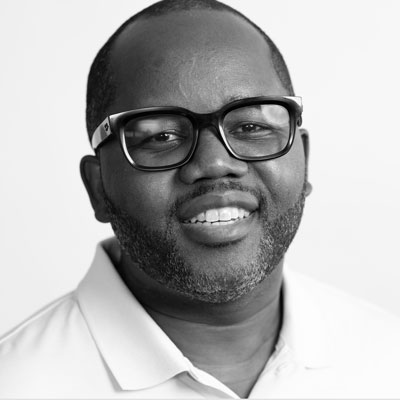
Larry is the Founder and Producer at Mammothic Films, with more than 15 years of production experience. He leads a team that creates story-driven videos for businesses and brands. A marketer, designer, and animator, Larry has overseen the production of more than 1,500 videos for Fujitsu, Logitech, Warner Brothers, NFL, Blockdaemon, Astronomer, Canonical, and 370+ other companies in Canada, the United States, and around the world.
Larry is a devout Christian who believes in placing God first, and that everything else is a blessing that comes from serving Him. When he’s not working, he’s hanging out with his wife and three kids, playing the piano, or sightseeing.
We use cookies to improve your experience on our site.
Manage your cookie preferences below:
Essential cookies enable basic functions and are necessary for the proper function of the website.
