Get an estimate for your video project in less than a minute.

Get an estimate for your video project in less than a minute.
3D product animation uses a digital model to show how an object looks, moves or works. It can reveal an internal mechanism or present a design before a physical sample is ready. This guide explains the main uses, how production works and what to supply to a studio. It also compares animation with filming so you can choose around the information your customer needs.
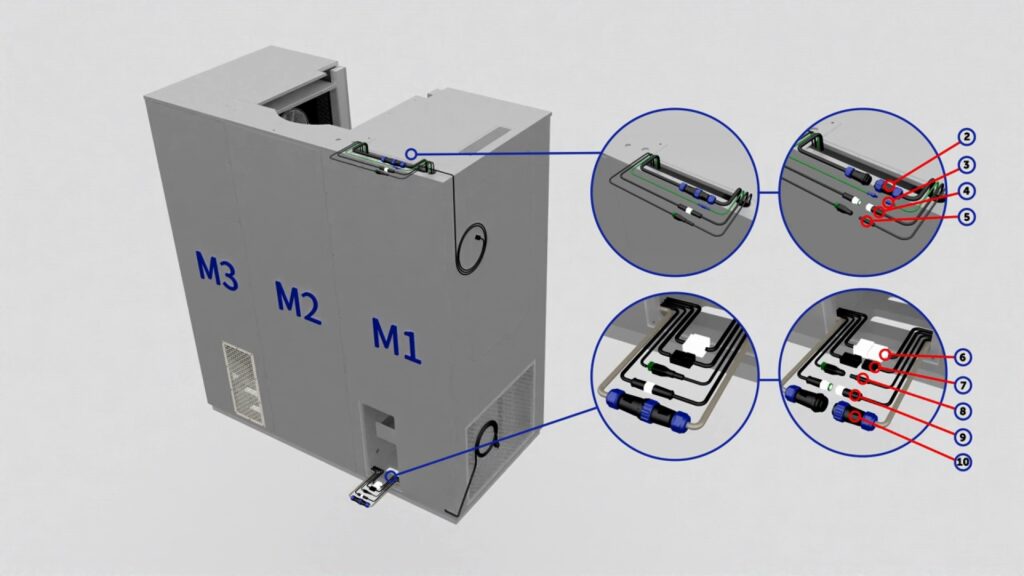

| What is 3D product animation? 3D product animation is a moving visual presentation built from a digital product model. It can show the exterior, separate components or demonstrate an approved action. Artists control the camera, surfaces and lighting. The result should match the product information and help viewers understand a feature that matters to their decision. |
3D product animation creates a moving view of an object inside a digital scene. The model represents its shape. Materials define how its surfaces appear. Animation controls the action or the viewpoint over time.
Filming records a physical object through a camera. Product animation builds the scene from prepared digital assets. That difference matters when the product does not exist yet or when the important action happens inside a closed housing.
A digital image can look convincing while representing the product incorrectly. The team needs approved references and a reviewer who understands the design. Confirm dimensions, labels and intended functions before polishing the scene. The goal is to communicate the relevant feature accurately. Surface realism should support that goal rather than conceal uncertain details. Record any simplified feature so the final presentation does not accidentally turn an explanatory choice into a product claim.
Start by identifying what the viewer needs to see. Is it how the product opens, how the parts fit together or what happens inside? Those questions help determine the camera angles and animation sequences. Before setting the production scope, check the available CAD files and product references. A model built for exterior views may need additional detail before it can be used for a cutaway showing internal components.
A product animation video is useful when the viewer needs a controlled view that filming cannot provide conveniently. Choose the view around a specific question.
Animation can present an approved design before a physical sample is available. The brief should identify what is final and what may change. Keep the model tied to the approved reference version. Do not imply that a concept image demonstrates tested performance. Review the description alongside the visuals before releasing pre-launch material.
A cutaway or separated view can explain what happens inside a product. A cutaway hides part of the exterior so internal components become visible. Plan which relationships matter. Showing every component at once can make the explanation harder to follow. A qualified product reviewer should approve the sequence and any simplified movement.
An ecommerce animation can answer a practical question about use or construction. Show the feature clearly before adding visual flourishes. Test the video at the size customers will see on the page. Labels need to remain readable. The animation should complement accurate product information rather than ask customers to infer essential specifications from a moving image.
An advertisement can use a controlled action to focus on one feature. A product might open or change position so the important detail is visible. Keep the sequence tied to a supportable message. A visually dramatic movement should not imply a capability the real object lacks. Review the claim and the action together.
A trade-show sequence needs to work when viewers arrive midway through it or cannot hear the audio. Use clear visual stages and readable labels. A loop should return deliberately to its opening state. Prepare a version for the actual screen and viewing distance. The booth team may also need a separate file for sales conversations.
3D product animation offers control over a digital scene, while live action records the physical product. Choose according to what the customer must see.
| Question | 3D product animation | Live-action product video |
|---|---|---|
| Changes | Digital assets can be revised. Some changes require new rendering. | New views may require another shoot. |
| Realism | Appearance must be created and checked. | Records the supplied physical object under planned lighting. |
| Physical product needed | Can begin from suitable approved design references. | Needs the object or an appropriate physical demonstration. |
| Reuse | Models may support other planned outputs. | Footage may support other edits within its recorded coverage. |
Animation can reveal a hidden feature. Filming can demonstrate real handling and surface behaviour. A combined approach may use both where each contributes useful evidence.
Do not compare the methods only by appearance. Identify the revision risk and the assets already available. Our guide to commercial video production provides context for the filming route. A test shot or a representative rendered frame can expose the difficult requirement before the whole project is commissioned.
A 3D product animation video is made by preparing an accurate model and building an approved visual explanation around it. Resolve the product facts before detailed finishing.
Keep the source files and approved references organized. A later version is easier to plan when the team knows which model and materials created the original.
3D product animation services can include asset preparation, visual planning, animation and finished delivery files. The proposal should state which tasks are included and who approves them.
A 3D product animation company may work from supplied design files or build the required assets from references. Confirm which route the quote assumes. A 3D product animation studio should explain how it checks accuracy before detailed finishing. A 3D product animation agency may also coordinate messaging or campaign versions. Those labels do not establish a fixed scope.
Ask product animation services providers about model ownership, source files and later updates. Confirm whether different screen formats require separate layout work.
We offer 3D product animation at Mammothic Films. Bring the feature you need to explain and the approved references that show it accurately. Comparing best 3D animation companies can help you define the production scope and the information your project needs before work begins.
Send a 3D product animation studio the information needed to model the right object and explain the right feature. Identify gaps before requesting a final quote.
Our product demo video companies guide provides another route for comparing production approaches.
The cost depends on the model preparation, number of scenes, materials, movement and delivery versions. A supplied CAD file may still need production work. Ask for a quote based on approved references and a clear message. Our guide to how much does animation cost offers broader context. Compare the included revisions and ownership terms as well as the quoted amount. Ask which supplied assets the estimate assumes and what additional preparation would change it.
You do not always need CAD files, but accurate design references are necessary. A team may build a model from drawings or other approved material if the scope allows it. Confirm which details are known and which require clarification. Good reference photographs do not automatically establish internal construction. Ask the production team what evidence it needs before expecting a model to represent the product accurately. Confirm who can answer technical questions during preparation so uncertain features are resolved promptly.
The schedule depends on model readiness, scene complexity and approval speed. A change to the product design can affect materials, animation and rendered images. Ask for milestones that include technical review before detailed finishing. Supply a current reference version and keep feedback coordinated. A meaningful time estimate requires the actual brief rather than the video length alone. Allow the technical reviewer to inspect an early model before detailed materials are approved.
3D animation is better when the explanation needs hidden views or a product that is not ready to film. Filming may be better for showing real handling and appearance. Choose around the evidence the customer needs. A digital scene should not imply tested behaviour without support. A combined production can use filming for real use and animation for the internal relationship that the camera cannot show. Test the transition between those views before commissioning every scene.
A 3D model can be reused when its technical condition and ownership terms allow it. New views may still require materials, animation and rendering work. Confirm the intended later uses in the original agreement. Keep the approved model and its references together. A model prepared for one distant view may need more detail before it can support a close-up in another production. Keep a clear record of which source version represents the current product.
Use 3D product animation to answer a product question that benefits from a controlled digital view. Prepare accurate references and approve the explanation before detailed finishing. Compare animation with filming according to the feature and evidence required. Clarify asset ownership and update needs in the proposal. A useful production makes the important part easier to understand while keeping the model and its behaviour tied to approved product information.
Related Articles

Larry is the Founder and Producer at Mammothic Films, with more than 15 years of production experience. He leads a team that creates story-driven videos for businesses and brands. A marketer, designer, and animator, Larry has overseen the production of more than 1,500 videos for Fujitsu, Logitech, Warner Brothers, NFL, Blockdaemon, Astronomer, Canonical, and 370+ other companies in Canada, the United States, and around the world.
We use cookies to improve your experience on our site.
Manage your cookie preferences below:
Essential cookies enable basic functions and are necessary for the proper function of the website.
